
Creating a User Profile
Breadcrumbs
Changed
Enter/Confirm your Email
To begin, enter and confirm your email address then click the CONTINUE button.
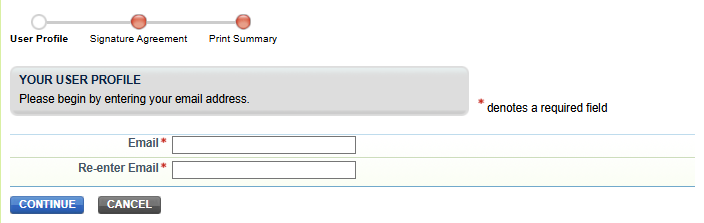
Keep your email secure: the portal will use it to send you important notifications. In order to use the portal, you must use an email account that you do not share with another portal user. When you sign the ESA, you agree to maintain the email address you have registered with the portal. If you change your email account, you must update your user profile immediately. Make sure your email system accepts email from the domain ccdsupport.com.
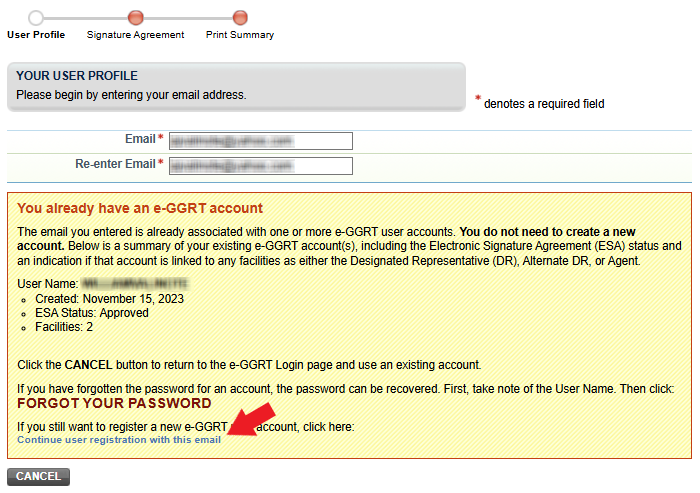
If the email address entered is already associated with an existing user account in portal, the "You already have a portal account" page will be displayed which provides summary information about the existing user account(s). This information is meant to prevent you from unknowingly or accidentally creating multiple accounts when in some situations it is unnecessary. However, if you need to continue with the same email address, you may do so by clicking the "Continue user registration with this email" link (see below).
Choose a Username
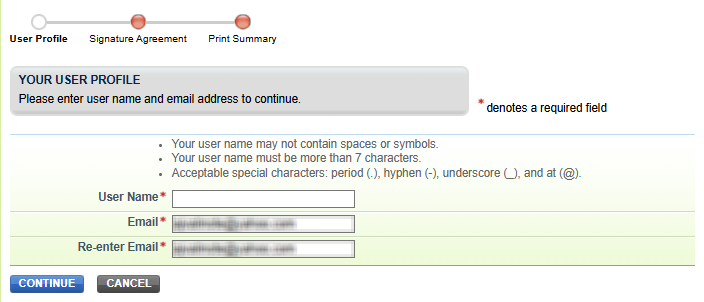
Note, if you are registering with an existing CDX user account you will not be prompted for a Username.
Usernames can never be changed. Therefore, we suggest not using your current email address as a Username as email addresses often change.
Complete your Profile
Please fill in the required fields, which are denoted by a red asterisk.
You will not be able to return to this page during the user registration process, so please review the information carefully before you click SAVE. After you click SAVE, you will not be able to change this information until after your Electronic Signature Agreement (ESA) has been approved.
Name Information
Please use your full/legal first and last name, no nicknames, for identity proofing purposes.
Address Information
If you do not live in the United States, please select your country from the list of countries, and select N/A from the list of states.
Contact Information
The email address you entered on the previous page will be pre-populated in the Email field. This field cannot be edited on this page.
Security Questions/Answers
Your security questions and answers are used to authenticate you in situations where you have forgotten your user name, for example. Please select security questions which have relevance to you and have answers not easily guessed by others.