
e-GGRT Login Error: "e-GGRT dataflow role is not active"
Breadcrumbs
Changed
Error text you may see:
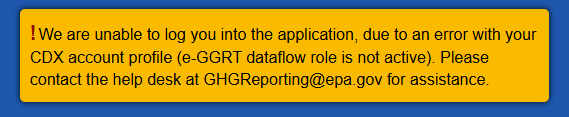
What does this error mean?
Your e-GGRT Program Service in EPA's Central Data Exchange (CDX) is inactive. e-GGRT checks that service when you sign in, and won't let you through while it is switched off. Your account and Login.gov sign-in are fine. The only thing wrong is that one connection between CDX and e-GGRT, and it needs to be switched back on.
Can I fix this myself?
No. This one requires the Help Desk. We have a tool that reactivates the e-GGRT Program Service; there is no equivalent control on your side.
If you are logged into CDX, in MyCDX do not attempt to add or edit you e-GGRP Program service. Unlike many other programs in CDX, the e-GGRT Program Service is only ever created by registering your CDX account in e-GGRT itself. Also, your role will be displayed as blank or "User" rather than something like preparer or certifier. As a user you cannot edit your e-GGRT Program Service in CDX.
What do I need to do?
Submit a ticket to the GHGRP Help Desk (email ghgreporting@epa.gov) and ask us to reactivate your e-GGRT Program Service.
So that we may better assist you, please include:
- The e-GGRT Username (aka CDX User ID) you are trying to sign in with. If you have more than one account, tell us which one you want reactivated.
- The exact error message you received.