
e-GGRT Message: "You already have an e-GGRT account"
Breadcrumbs
Changed
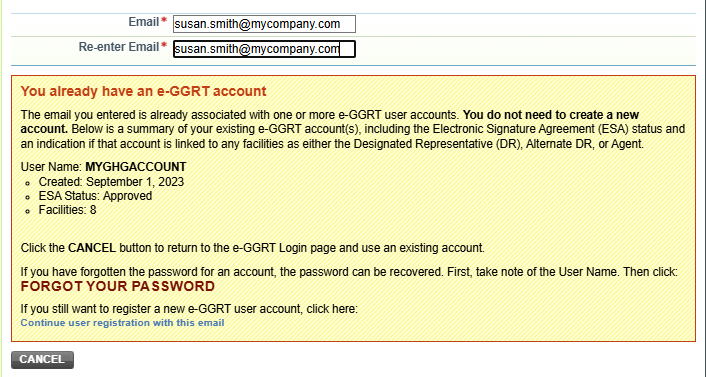
Message you may see, in a yellow box, during e-GGRT user registration:
You already have an e-GGRT account
Is this an error?
No. Nothing has gone wrong, and your access has not been blocked.
It is information, meant to help you recognize that you already have an e-GGRT account so you don't create a second one you don't need. It appears in a yellow warning box, which makes it look more alarming than it is.
You are allowed to continue and register a new account. But read the next section first — in many cases you shouldn't.
Why am I seeing this?
Because you entered the e-GGRT user registration process. There are two ways to end up there:
- You chose to register. You clicked CREATE ACCOUNT at https://ghgreporting.epa.gov.
- e-GGRT put you there automatically. You entered a CDX username that has never been used with e-GGRT before. Even if that username works fine in CDX, e-GGRT treats it as new and routes you through registration. This surprises a lot of people — they believe they are simply logging in.
Either way, when you enter your email address, e-GGRT checks it against existing accounts and shows you this message.
First, check whether you need a new account at all
The message lists the User Name of each existing e-GGRT account tied to your email. That is the important detail on the screen.
Your facilities are attached to that existing account, not to your email address. If you can still use it, doing so saves you a significant amount of work.
- Note the User Name shown in the message.
- Click CANCEL to return to the e-GGRT login page.
- Enter that User Name and sign in.
- If you don't remember the password, use the FORGOT YOUR PASSWORD link rather than creating a new account.
If you get in, you're done — and your facilities will be waiting for you.
What if I can't use my existing account?
The most common reason is a deleted or replaced Login.gov account.
Each CDX/e-GGRT username is linked to one Login.gov account, and that link can never be changed or undone. If you deleted the Login.gov account that was linked to your old username, that username can no longer be used — even though your new Login.gov account works perfectly well elsewhere. In that situation you do need to register a new account.
How do I continue registering?
Find the link at the bottom of the yellow box: "Continue user registration with this email." Click it and complete the registration process.
Two things to expect along the way:
- Connecting to Login.gov. You'll be offered "Sign in" and "Create an account." If you already have a working Login.gov account, choose Sign in — you do not need to create yet another one.
- Switching between accounts. If you are moving between an old and a new account, leave Login.gov's "Remember this browser" box unchecked, so a remembered session doesn't sign you in as the wrong user.
Will my facilities carry over to the new account?
No. This is the part people most often don't expect.
A new account starts with no facility access, even though it uses the same email address and belongs to the same person. e-GGRT connects facilities to a user account, not to an email address.
To regain access, the facility's current representative(s) must use e-GGRT to remove the "old you" and appoint the "new you." EPA then reviews the appointment, and once it's approved you'll receive an email containing a one-time acceptance code. Sign in with your new account and use that code to restore your access.
This is the main reason to try your existing account first.